
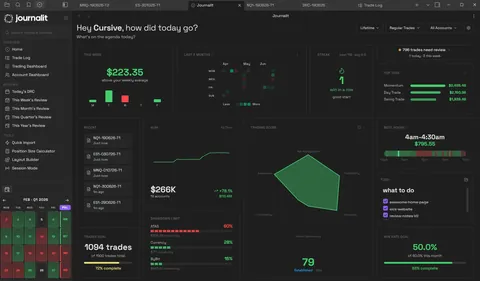
How Journalit works in Obsidian
Start manual, add automation whenever you want. Your journal structure never changes.
- 1
Capture trades
Log trades manually for any market, or automate it later with Trade Import and Trade Sync for supported brokers. - 2
Review your process
Built-in templates for trade notes and daily, weekly, and monthly reviews. - 3
Analyse what actually matters
Performance, drawdowns, setups, mistakes, and consistency, all inside Obsidian.
How trades live inside your Obsidian vault
No database, no markdown skills needed. Every trade is a normal note you can open, read, and edit like any other.
Reviews that read like a conversation
Guided prompts, checkboxes, and space to write.
Open a trade and answer plain questions: did you follow the plan, how did it feel, what will you do differently. Screenshots and metrics sit right next to your words.
Just folders and files in your vault
Journalit/
  Trades/
  Reviews/
    Daily Report Cards/
    Weekly Reviews/
    Monthly Reviews/
  Screenshots/
  Strategies/
Manual Obsidian template vs Journalit plugin
Testing the waters? Start with a template. Want the full system? Install the plugin.
Manual template
- • Written notes and screenshots, nothing more.
- • You maintain fields, folders, and review pages yourself.
- • Good for deciding if Obsidian fits your workflow.
Journalit plugin
- • Notes, dashboards, analytics, and imports in one vault.
- • Trade records, review templates, and mistake tracking built in.
- • Add Trade Import or Trade Sync for supported brokers when you outgrow manual entry.
The free plan is the full journal
Journalling, analytics, and reviews are all included for free, and your journal stays on your own device. Pro only adds Trade Import and automatic trade sync.
Built-in review workflows
Trade notes, Daily Report Cards, and weekly to yearly review templates.
Analytics and Trade Log
Performance by account, setup, and mistake, without leaving Obsidian.
Notes and screenshots
Written context and charts next to every trade.
Customise everything
Prompts, layouts, fields, tags, and review logic. Set it up the way you actually trade.
Related: what stays free, best free trading journals, Notion vs Obsidian, and journals for review notes.
Go Pro only when you want Trade Import and automatic trade sync
Free covers journalling and analysis. Pro adds Trade Import, automatic trade sync, the Economic Calendar, and prop-firm profiles.
Trade import
Import broker CSV exports directly, or let AI-assisted mapping handle the messy ones.
MetaTrader 4 sync
Set up MT4 once and new trades sync in hourly with duplicate detection. MT5 trades import from an HTML statement. Not real-time, and English MetaTrader reports only for now.
Frequently asked questions
Pricing
Journalit is free for journalling, analytics, reviews, and templates. Pro unlocks Trade Import, automatic trade sync, the Economic Calendar, and prop-firm profiles.
Free
Manual journaling, flexible reviews, and analytics on your device.
INCLUDES
- Unlimited trades & accounts
- Journal stored on your device
- Custom fields & properties
- Rich markdown notes
- Analytics dashboard
Pro
Billed annually at $180/year
Skip the spreadsheet cleanup. Sync and import trades into the journal you already review.
EVERYTHING IN FREE, PLUS
- Automatic Trade Sync for supported brokers
- Trade Import for broker exports and statements
- Economic Calendar with weekly event imports
- Prop-firm profiles that prefill challenge rules
- Multi-account sync support
- Priority support