
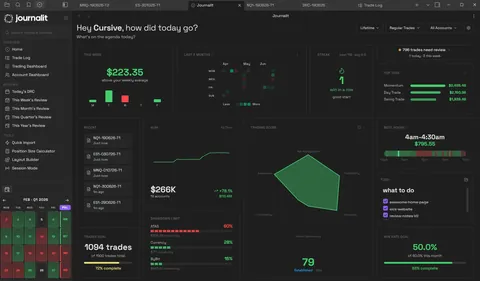
Free is the journal. Pro is the automation.
Enter and review trades manually for free. Upgrade when you want Journalit to import or sync them for you.
| Capability | Free · $0 ongoing | Pro · automation |
|---|---|---|
| Manual trade entry | Included | Included |
| Number of trades | Unlimited | Unlimited |
| Trading accounts | Unlimited | Unlimited |
| Notes and screenshots | Included | Included |
| Analytics and dashboards | Included | Included |
| Recurring review workflows | Included | Included |
| CSV and spreadsheet trade import | Signed-in preview only; Pro is required to add imported trades | Included |
| Broker and platform sync | Not included | MT4, Tradovate, cTrader and Rithmic, including supported NinjaTrader accounts |
| Economic event tracking | Add key events to your weekly review manually | Economic Calendar with automatic weekly event imports |
| Prop challenge tracking | Track phases, rules, and payouts you enter yourself | Prop-firm profiles that prefill challenge rules and flag rule updates |
See the journal you can use for free
Journalit is a working trade journal inside Obsidian, not a stripped-down spreadsheet template. These views are part of the core journalling and review workflow.
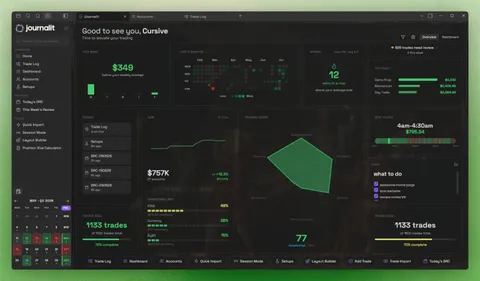
Your journal and reviews in one view
Open Journalit to see recent trades, review prompts, goals, and account performance.
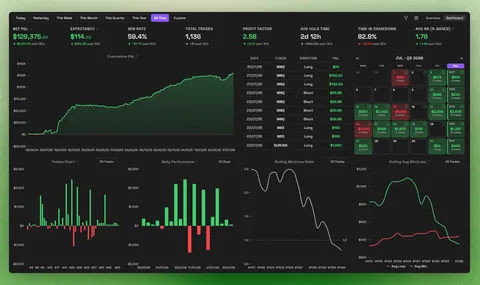
Analytics are included in Free
Analyse setups, sessions, symbols, accounts, and habits without moving your journal to a hosted dashboard.

Notes and chart screenshots on every trade
Each trade is a note with its result, your thesis, setups, mistakes and the charts you took it from.

Daily reviews that show what is left
The Daily Report Card lists the day's trades and which ones you still need to review. Weekly to yearly reviews are free too.

Setups with their playbooks and results
Keep each setup's playbook and rules with its results, then compare two setups side by side to see which one earns its place.

Every account in one overview
Track unlimited accounts for free, including evaluations, funded and demo accounts, and see how they have grown together.
What you get from a free trading journal
The core journal stays free: unlimited trades, analytics, notes, screenshots, and recurring reviews.
Unlimited journalling
Unlimited trades and accounts for a real trade-by-trade record.
Analytics included
Dashboards, filters, and Trade Log without a paywall.
Notes and screenshots
Keep written context and charts beside every trade.
Recurring review templates
Daily to yearly reviews for process, not just stats.
Why the Free plan is not a trial
The manual journal is the product, not a short trial. Paid features save time by importing and synchronising trades.
- 1
$0 for the core workflow
Add trades manually, write notes, attach screenshots, analyse results, and complete reviews without a time limit. - 2
It is built for review
Capture what happened, why it happened, and what to change next. - 3
Your journal stays on your device
Journalit runs inside Obsidian, a free notes app. Your journal files are ordinary Markdown you control, and the core workflow does not need a Journalit sign-in.
Go deeper when it helps
This page stays focused on Journalit. These guides cover related workflows and alternatives.
A free trading journal for day, stock, futures, forex, and crypto traders
Use the same notes-first workflow across markets. The important distinction is how you add trades: manually with Free, or through supported automation with Pro.
Good fit
You want unlimited manual trades, notes, screenshots, analytics, and repeatable reviews.
Also a good fit
You want a free journal without keeping your trading records in another hosted dashboard.
Less ideal fit
You need built-in trade replay, broker sync included in the free plan, or a hosted mobile-first app.
Free trading journal FAQ
Plans and pricing
Keep using the manual journal for $0. Choose Pro if imports and broker sync will save you time.
Free
Manual journaling, flexible reviews, and analytics on your device.
INCLUDES
- Unlimited trades & accounts
- Journal stored on your device
- Custom fields & properties
- Rich markdown notes
- Analytics dashboard
Pro
Billed annually at $180/year
Skip the spreadsheet cleanup. Sync and import trades into the journal you already review.
EVERYTHING IN FREE, PLUS
- Automatic Trade Sync for supported brokers
- Trade Import for broker exports and statements
- Economic Calendar with weekly event imports
- Prop-firm profiles that prefill challenge rules
- Multi-account sync support
- Priority support