
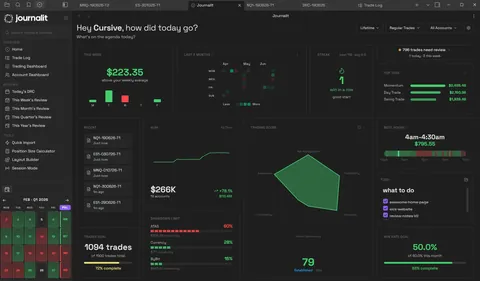
One workspace for the whole session
Most journals start after your trades close. Session Mode is phase-aware: it changes with your configured trading windows, from preparation to review.
1
Preparation
Review the day, prepare levels and scenarios, check goals, and make your rules explicit before execution begins.
2
Waiting
Intentionally quiet before the window opens, so the workspace does not invite action too early.
3
Live
Capture Session Log notes as they happen and run Trade Gate decision workflows without leaving the workspace.
4
Break
Configured pauses stay calm by design, so a break remains a break instead of more screen time.
5
Ended
Hand off into the Daily Report Card and review the session while preparation, decisions, and trades are still connected.
The mechanics are documented in the Session Mode guide.
A decision system, not a checklist
Trade Gate turns your entry rules into a configurable decision tree you run while the decision is live. Every path ends at Green light, Wait, or No trade.
- Sequential, not skimmable. You answer one question at a time and the gate routes you based on your answer, instead of a checklist you can wave through.
- Built from your rules. Adapt the built-in Basic entry gate or build workflows for specific situations: news windows, revenge-trading risk, or an A-grade-only day.
- Stored with the session. Completed runs persist with the Daily Report Card, so review shows the decisions you made, not just the trades you took.
- Testable before live. Simulate a draft workflow in settings before trusting it under pressure.
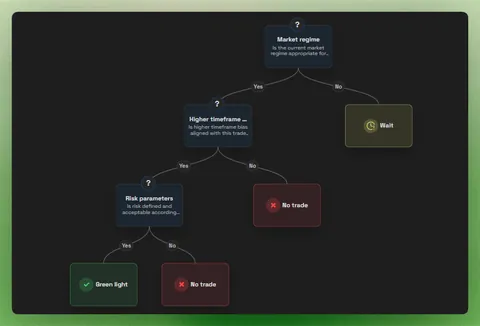
A starter gate you can build today
Three questions are enough to start. Recreate this in Settings → Journal Setup → Session Mode → Trade Gate by adapting the built-in Basic entry gate.
1. Does this setup meet every rule in my plan?
- No → No trade
- Yes → next question
2. Is my risk defined before entry?
- No → Wait
- Yes → next question
3. Is high-impact news due within the next 30 minutes?
- Yes → Wait
- No → Green light
Keep gates short enough to use under pressure; add a follow-up question only when its answer changes the next decision. The full editor walkthrough is in the Session Mode docs.
Live notes that survive until review
The Session Log captures what you saw and felt while it was happening, then meets you again in the post-session review.
During the session
Tag notes as Analysis, Trade, Market, Psychology, or Lesson while trading. Trade entries and exits can appear on the same timeline, or be hidden when they add noise.
After the session
Entries are grouped by your configured session windows on the Daily Report Card, and lesson-tagged notes are surfaced so they do not disappear into the timeline.
On your device
Session entries are plain files on your computer, like the rest of your journal. See why the journal is local-first.
Session workflow questions
Free vs Pro
Session Mode, the Session Log, and Trade Gate are free. Pro unlocks Trade Import, automatic trade sync, the Economic Calendar, and prop-firm profiles.
Free
Manual journaling, flexible reviews, and analytics on your device.
INCLUDES
- Unlimited trades & accounts
- Journal stored on your device
- Custom fields & properties
- Rich markdown notes
- Analytics dashboard
Pro
Billed annually at $180/year
Skip the spreadsheet cleanup. Sync and import trades into the journal you already review.
EVERYTHING IN FREE, PLUS
- Automatic Trade Sync for supported brokers
- Trade Import for broker exports and statements
- Economic Calendar with weekly event imports
- Prop-firm profiles that prefill challenge rules
- Multi-account sync support
- Priority support