Futures and forex trading contains substantial risk and is not for every investor. An investor could potentially lose all or more than the initial investment. Risk capital is money that can be lost without jeopardizing one’s financial security or lifestyle. Only risk capital should be used for trading and only those with sufficient risk capital should consider trading. Past performance is not necessarily indicative of future results.
Hypothetical Performance Disclosure
Hypothetical performance results have many inherent limitations, some of which are described below. No representation is being made that any account will or is likely to achieve profits or losses similar to those shown; in fact, there are frequently sharp differences between hypothetical performance results and the actual results subsequently achieved by any particular trading program. One of the limitations of hypothetical performance results is that they are generally prepared with the benefit of hindsight. In addition, hypothetical trading does not involve financial risk, and no hypothetical trading record can completely account for the impact of financial risk of actual trading. for example, the ability to withstand losses or to adhere to a particular trading program despite trading losses are material points that can also adversely affect actual trading results. There are numerous other factors related to the markets in general or to the implementation of any specific trading program that cannot be fully accounted for in the preparation of hypothetical performance results and all which can adversely affect trading results.
Session Mode is a phase-aware trading workspace for the active session. It helps
you prepare before the window opens, stay focused while trading, capture session
notes as they happen, and carry useful lessons into review.
This brings Journalit into the trading process itself, rather than limiting it
to analysis after trades have closed. You can prepare deliberately, check your
process while decisions are live, and review the session afterwards with the
full context still connected.
Best use of Session Mode
Use it when your trading day has defined windows, pre-session preparation,
live execution rules, breaks, and end-of-session review habits.
What Session Mode Includes
Phase-aware workspace
The view adapts across Preparation, Waiting, Break, Live, and Ended phases based on your configured session windows.
Session Log
Capture manual session notes and review trade-derived timeline entries in the same session context.
Trade Gate
Run a configurable decision workflow before or during trades so process checks happen while they matter.
DRC connection
Session entries are stored on the Daily Report Card and grouped by configured session windows during review.
Session Phases
Session Mode changes based on where you are in the trading window. You do not
need one screenshot for every phase in the docs, but the phases are different
enough that the documentation should explain what each one is for.
Preparation is the planning phase before the configured session window. Use
it to review the day, prepare levels or scenarios, check goals, and make
sure your rules are clear before execution begins.
Planning first
Preparation keeps the session focused on intent before any trade pressure appears.
Customisable layout
Choose which preparation modules appear when this phase matters to your workflow.
DRC context
Preparation belongs with the Daily Report Card, so session planning and later review stay connected.
Configure Sessions
Open Journalit settings, then go to Journal and open
Session Mode to configure it.
Define session windows
Add the trading windows that matter to your process. Session grouping is derived
from timestamps and configured windows, so entries outside a configured window
appear under Outside sessions.
Choose phase layouts
Preparation, Live, and Ended phases can be customised so the workspace shows the
modules you actually use. Waiting and Break stay intentionally focused.
Customise Session Log tags
Edit the tags used for session notes, such as Analysis, Trade, Market,
Psychology, Lesson, and Uncategorized.
Configure Trade Gate workflows
Build the decision workflow you want to use before or during a trade. Start
with the included workflow, then adapt its questions, options, and outcomes to
your own rules. See Build a Trade Gate workflow
for the full walkthrough.
Session Activity Indicator
The Session Mode entry points show whether a configured session window is
active. The navigation sidebar item, the Home Quick Link, and the Session Mode
tab icon share the same state.
Live
A pulsing red indicator while a session window is live, with screen reader text describing the phase.
Preparation
A static amber indicator during the preparation lead time before the session window starts.
Quiet phases
Waiting, Break, Ended, and unconfigured states carry no indicator, so the pulse always means live trading time.
Reduced motion settings replace the live pulse with a static red icon.
Unplanned Sessions
Unplanned sessions cover trading outside the configured session windows. Start
one from the Session Mode header, the ended action list, or the setup and empty
state whenever no session is live. Stopping is available from the live strip
and from commands.
Reason required
Starting an unplanned session asks for a reason. The reason appears beside the live session and in review.
Clearly labelled
The live view, ended summary, and review groups carry an Unplanned badge so off plan trading stays visible.
Schedule override
A running unplanned session overrides the schedule until stopped, even when a planned window starts in the meantime.
Review record
The session is stored on the day DRC and grouped as Unplanned at start time in the Session Log review widget. Entries outside any session still appear under Outside sessions when that group has content.
Start is refused while any session is live. A session that is never stopped
ends at the trading day cutoff.
Session Log
The Session Log is for notes that belong to the session rather than to a single
trade.
Manual entries
Capture observations, emotions, market changes, execution notes, and lessons while the session is active.
Trade timeline
Show automatic trade entry and exit events alongside manual notes, or hide those events when they add noise.
Lesson surfacing
Entries tagged as lessons can be surfaced in review so important observations do not disappear into the timeline.
Review widget
Add the Session Log widget to DRC layouts in Layout Builder to review session activity by configured window.
Control automatic trade events
In Session Mode settings, open Session log and use
Trade entries and exits to control automatic trade timeline
events. Turn it off when you want the live Session Log and the DRC Session Log
widget to show only notes you wrote yourself. Manual entries remain visible, and
ended-session trade statistics still use the full session data.
Trade Gate
Trade Gate turns checklist-style discipline into an active workflow. Use it for
rules that should be confirmed before acting, such as setup validity, risk,
news, position size, or emotional state.
Configurable workflows
Build gates with the steps and outcomes that match your process.
Live execution
Run a gate inside the Live phase without leaving the session workspace.
Persistent state
Completed and restarted gate state is stored with the DRC session context.
Build a Trade Gate workflow
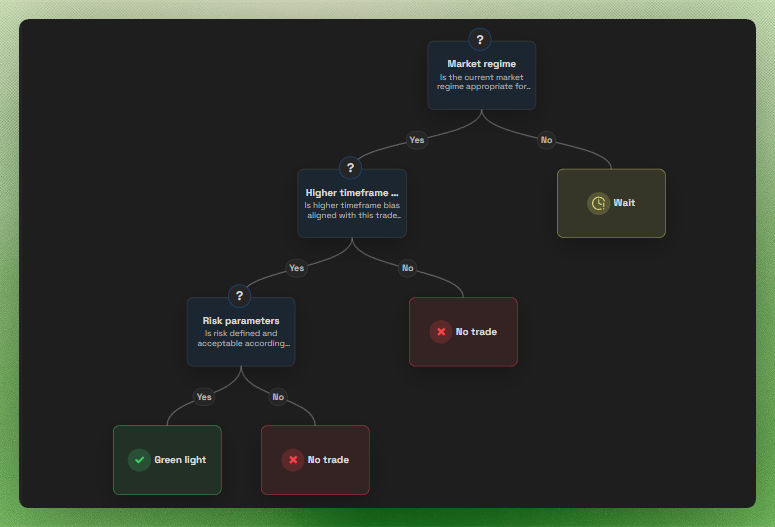
A Trade Gate is a decision tree. It starts with one question, then each answer
leads either to another question or to a final outcome. Build it around the
decisions you genuinely need to make before placing a trade, rather than trying
to turn every trading rule into a separate question.
The idea to remember
Every option needs a destination. Choose another question when the trader
needs to make one more decision. Choose an outcome when the decision is
complete.
Understand the building blocks
Question library
A reusable collection of decision prompts and answer options.
Placement
One occurrence of a question in a workflow. Each placement keeps its own routing.
Route
The next question or final result selected for one answer option.
Result
Green light, Wait, or No trade, with optional guidance written for that specific branch.
For example, a simple workflow can look like this:
Is this an A-grade setup?├─ No → No trade: Skip anything outside the playbook└─ Yes → Is risk defined before entry? ├─ No → Wait: Set the stop and size first └─ Yes → Green light
The first Yes continues to another question. The other answers end
that path with a result and can include guidance for what to do next.
Create or open a workflow
Open Journalit settings, choose Journal, then open
Session Mode. Find Trade Gate and expand an
existing workflow or select Add.
If no workflows exist, the first Add action creates the
Starter Trade Gate with a working example and adds its starter
questions to the library. Further workflows start empty, so you can choose or
create their questions yourself.
Name the workflow and place its first question
Give the workflow a name that tells you when to use it, such as
London open pullback or High-impact news check. Add a
question from the library and set that placement as the start of the workflow.
An expanded workflow includes Workflow name,
Start question, Simulate, and
Add question. The flow map is the working editor. Use Fit,
zoom, or drag to navigate a larger tree, then select a question card, path
label, outcome, or unwired option to edit the relevant question and route.
Build and manage the question library
Open the question library to create, edit, remove, or place questions. Each
question has a short title, the full prompt shown during a gate run, and its
answer options. Search matches titles, prompts, and option labels. The library
also shows whether a question is unused or how many workflows use it.
A question can be used across workflows. Routing belongs to its placement in a
workflow, not to the library question itself. This prevents editing one branch
from rewiring another workflow that uses the same prompt.
When you place a question that is already used in the same workflow, Journalit
creates an independent copy with the title and prompt carried across. Add the
answer options and routes for that occurrence so repeated checks do not share
branch state.
Deleting a library question also removes its placements and connected branches
from every workflow that uses it. Use Remove from this workflow
inside the question editor when you only want to remove one placement.
Route every option
Select a placed question in the flow map, then use each option's
Leads to menu:
Keep Current: question name when the existing branch should
remain connected.
Choose a question from the library when the decision should continue.
Choose + New question to create the next prompt while editing
the current branch.
Choose Green light, Wait, or
No trade when the path should finish.
Add an Outcome note (this branch only) when the trader needs
specific guidance at the end of that answer path.
Unwired options appear as dashed amber chips on the map. Treat those as an
unfinished workflow, because a live run cannot continue through an option that
has no route.
Question and route changes are applied together when you select
Save. Cancel closes the editor without creating pending
questions or placements.
Add another branch
Open the current question and choose a library question or
+ New question from the option's Leads to
menu. Journalit creates and connects the follow-up placement in one save. Each
placement has its own ID and routing, so the same underlying question can appear
in different branches without those branches overwriting each other.
The workflow-level Add question action can also place a
library question without connecting it. It appears under In this
workflow, not connected yet until you route an option to it or choose
it as the start question.
For a question with four options, configure all four routes independently. One
answer can continue to a risk check while the others finish with Green light,
Wait, or No trade.
Check the full path before using it
Follow every option from the start question to a result. Resolve dashed unwired
options and anything listed under In this workflow, not connected
yet before relying on the workflow in a live session.
Keep the gate short enough to use under pressure. Add another question only
when its answer changes the next decision.
Simulate the workflow
Use the Play control on an expanded Trade Gate workflow to test its current
draft directly in Settings. The simulator starts at the first runnable question
and follows the same options and outcomes as the live Trade Gate.
Simulation remains unavailable until the start question connects to at least
one complete outcome.
Saved configuration
Save question and routing edits, then test the resulting workflow without opening Session Mode.
Local simulation
Simulated answers and outcomes stay in Settings and are not written to the Daily Report Card.
Real workflow paths
Completed steps, the active question, available answers, and the final outcome follow the live traversal rules.
Restart safely
Restart the simulation at any time. Routing changes reset it, while copy-only edits preserve the current progress.
Show and run Trade Gate in Live mode
In the Phase layouts section of Session Mode settings, open
the Live tab and make sure Trade Gate is
enabled. Trade Gate appears in Session Mode during the Live phase when this
module is part of the layout.
Select the workflow in the Trade Gate panel and choose Start.
Each selected option is kept visible as a completed step. When an option leads
to an outcome, the run completes and shows its result. Use the restart button
to begin another run with the same workflow.
Review The Session
At the end of a session, use the Ended phase and the DRC Session Log widget to
review what happened while the context is still fresh. The goal is to connect
preparation, live decisions, trades, and lessons in one workflow instead of
splitting them across disconnected notes.