
Free Obsidian trading journal templates
Start with a complete workflow, then change the parts that do not fit.
Trade note template
Structured trade data, screenshots, psychology, and reflections in one note.
Daily Report Cards
Pre-trade, execution, and post-trade prompts for a repeatable routine.
Weekly to yearly reviews
Review templates for consistency, trends, and strategic reflection.
Win and loss review questions
Daily trade reviews ask different questions for wins, losses, breakevens and open trades.
What the templates look like in use
These come with the plugin. There is nothing to download or copy into Obsidian: install Journalit and the templates are ready.

The built-in layouts
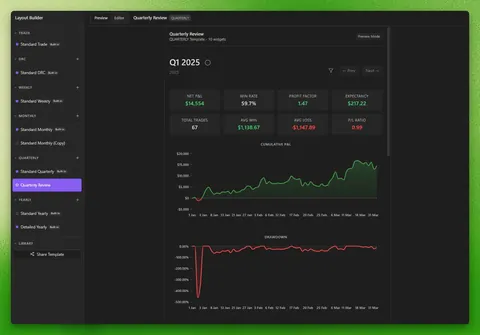
Trade notes, Daily Report Cards and weekly, monthly, quarterly and yearly reviews each start from a built-in layout. Duplicate one to make your own version.

A finished trade note
The trade note template puts the result, dates and chart screenshots first, with your thesis, setups and mistakes underneath.

The daily trade review
The Daily Report Card lists the day's trades and tracks which ones you have reviewed.
Getting to your first template
- 1
Install Obsidian and Journalit
Obsidian is a free notes app. Add Journalit from its Community Plugins directory, then create your first trading account in the short setup. - 2
Add a trade or start a review
Adding a trade creates a trade note from the built-in layout. Running Open DRC (daily report card) from the command palette creates that day's Daily Report Card. - 3
Change what does not fit
After a week or two of use, open the Layout Builder and adjust prompts, sections and fields to match how you review.
Customise the templates around your workflow
Keep the defaults, then change prompts, fields, scoring, and layout as your process becomes clearer.
01
Start from the defaults
Use the built-in trade and review flow before changing anything.
02
Edit visually
Change prompts, widgets, fields, and section order in the Layout Builder instead of hand-editing raw files.
03
Save your version
Keep a workflow that reflects your setups, review habits, and rules.
Who these Obsidian trading journal templates fit
A practical starting point for traders who want structure without losing ownership of the vault.
Start simple
You want ready-made trade notes and review prompts instead of a blank markdown file.
Build your process
You want to shape the workflow around your setups, mistakes, and review language over time.
Keep the files
You want an Obsidian vault you can read, edit, and keep even if your plugin setup changes later.
Templates or a Dataview setup?
If you are weighing these templates against building your own journal with Dataview queries, read Dataview or Journalit: when plain Dataview is enough and what the plugin adds. For how templates, trade notes, imports and reviews fit together, see the Obsidian trading journal guide.
Obsidian trading journal templates FAQ
Free vs Pro
Journalit is free for journalling, analytics, reviews, and templates. Pro unlocks Trade Import, automatic trade sync, the Economic Calendar, and prop-firm profiles.
Free
Manual journaling, flexible reviews, and analytics on your device.
INCLUDES
- Unlimited trades & accounts
- Journal stored on your device
- Custom fields & properties
- Rich markdown notes
- Analytics dashboard
Pro
Billed annually at $180/year
or $19/month billed monthly
Skip the spreadsheet cleanup. Sync and import trades into the journal you already review.
EVERYTHING IN FREE, PLUS
- Automatic Trade Sync for supported brokers
- Trade Import for broker exports and statements
- Economic Calendar with weekly event imports
- Prop-firm profiles that prefill challenge rules
- Multi-account sync support
- Priority support