
Why review notes matter
Improvement comes from reviewing what you thought, what you missed, and whether the setup matched the plan.
- 1
Capture the thinking behind the trade
Record the setup, execution decisions, mistakes, and lessons instead of only the result. - 2
Keep screenshots with the written review
A chart is more useful when it stays attached to the note explaining what you saw. - 3
Turn single notes into a review habit
Keep written observations available for daily, weekly, and longer-horizon reflection.
Reviews that turn notes into a habit
Guided prompts, screenshots, and space to reflect.
Open a trade and work through plain questions about the plan, execution, and lesson. Screenshots and metrics stay next to the review.
What the review-notes workflow includes
Review notes stay tied to trades, screenshots, filters, and recurring review pages.
Written review notes
Keep the post-trade explanation, lesson, and reflection beside the trade itself.
Screenshots with context
Keep charts next to the written review instead of scattering them across folders or apps.
Analytics for the patterns
Use filters and dashboards to compare written lessons with actual outcomes.
Recurring reviews
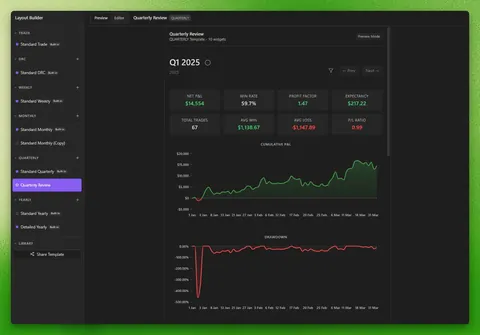
Use daily, weekly, monthly, quarterly, and yearly pages to make reflection repeatable.
Who this trading journal for review notes fits
For traders who want a serious review workflow, not another stats dashboard.
Good fit
You want a repeatable review loop that connects each trade to a lesson.
Also a good fit
You have notes already, but they disappear before your weekly or monthly review.
Less ideal fit
You need replay tooling, broker automation, or a hosted dashboard before a review habit.
Trading journal for review notes FAQ
Free vs Pro
Journalit is free for review notes, screenshots, analytics, dashboards, recurring review templates, unlimited trades, and unlimited accounts. Pro is for automation only.
Free
Manual journaling, flexible reviews, and analytics on your device.
INCLUDES
- Unlimited trades & accounts
- Journal stored on your device
- Custom fields & properties
- Rich markdown notes
- Analytics dashboard
Pro
Billed annually at $180/year
or $19/month billed monthly
Skip the spreadsheet cleanup. Sync and import trades into the journal you already review.
EVERYTHING IN FREE, PLUS
- Automatic Trade Sync for supported brokers
- Trade Import for broker exports and statements
- Economic Calendar with weekly event imports
- Prop-firm profiles that prefill challenge rules
- Multi-account sync support
- Priority support