TradesViz alternative with unlimited free journalling and local files
TradesViz is a broad hosted analytics platform with broker sync, simulation, AI, and options tools. Journalit is the local-first alternative for unlimited free journalling, detailed psychology workflows, offline access, and markdown files in your own Obsidian vault.
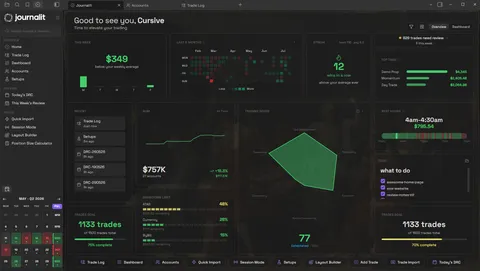
Journalit Home View brings reviews, goals, account metrics, and performance context into one journal.
TradesViz pricing in 2026
TradesViz offers a stock-only Basic plan and two paid plans. Its annual prices are displayed as monthly equivalents billed annually, so this comparison preserves that wording instead of presenting a calculated yearly total as an official price.
- TradesViz starting price
- Free Basic plan · paid plans start at US$19.99/mo (Pro) and US$29.99/mo (Platinum)
- TradesViz free tier
- Basic: stocks, 1 account, 3,000 executions/month
- Journalit starting price
- Free
- Journalit free tier
- Unlimited trades, accounts, analytics, templates, and reviews
Bottom line: Both products have a free plan, but they solve different problems. Journalit keeps unlimited trades and accounts free and stores the journal in your Obsidian vault. TradesViz's paid plans may justify their cost if hosted broker sync, simulators, options tooling, or dense quantitative analysis are central to your workflow.
Quick verdict
- Free-plan focus
- Journalit for unlimited trades, unlimited accounts, notes, screenshots, analytics, and recurring reviews. TradesViz Basic if free stock auto-sync matters more than broader free-plan limits.
- Simulation and options focus
- TradesViz Platinum if you need integrated replay, multi-asset simulation, AI analysis, options flow, or options-specific tools.
- Ownership and psychology focus
- Journalit for local files, offline access, Session Mode, custom review fields, mistake tracking, missed trades, recurring reviews, and mental ratings.
Checked 1 Sep 2026 · View pricing source
Is TradesViz worth it?
TradesViz and Journalit overlap on journalling and analysis, but their strongest use cases are substantially different.
TradesViz is worth it if...
You want a hosted quantitative-analysis platform with broker sync, custom dashboards, simulators, AI-assisted review, or options-focused tools.
Journalit is worth it if...
You want unlimited free journalling, detailed psychology and recurring-review workflows, offline access, and readable markdown files you control.
TradesViz is a worse fit if...
You do not want your journal centred on a hosted account, or you need a clearly documented complete export of notes, screenshots, and the full journal record.
Why traders look for a TradesViz alternative
The main differences are free-plan breadth, product complexity, offline access, and whether the journal remains a set of files you can inspect outside the product.
Want fewer free-plan limits
Journalit's free tier supports unlimited trades and accounts across its manual journalling workflow. TradesViz Basic is limited to stocks, one account, and 3,000 executions per month.
Want psychology built into review
Journalit combines Session Mode, custom review fields, mistake tracking, missed trades, recurring reviews, and mental ratings rather than treating psychology as a single analytics panel.
Want a complete local record
Journalit stores notes, screenshots, templates, trades, and reviews as readable vault files. TradesViz documents downloading prior import files, but not a complete journal export.
Journalit vs TradesViz feature table
| Feature | Journalit | TradesViz |
|---|---|---|
| Free tier | Unlimited trades and accounts, analytics, notes, screenshots, and recurring reviews | Stocks only, 1 account, and up to 3,000 executions per month |
| Journal storage | Markdown files in your own Obsidian vault | Hosted TradesViz account; U.S.-based servers |
| Psychology workflow | Session Mode, custom review fields, mistake tracking, missed trades, recurring reviews, and mental ratings | Trading plans and checklists, tags, and mistake analysis on paid plans; AI Coach behavioural detectors on Platinum |
| Imports and sync | Pro: Trade Import for supported broker files and automatic Trade Sync for supported brokers | Free stock sync for supported brokers; paid multi-asset imports and broad sync coverage |
| Simulation and replay | Not a core product focus | Platinum includes multi-asset simulators, what-if tools, backtesting, and options simulation |
| Offline use | Yes | Online browser and mobile product; offline workflow not documented |
| Data portability | Journal content remains as readable files in your vault | Prior import-file download documented; complete journal export not established |
Pricing snapshot
Journalit
- Unlimited trades and accounts
- Analytics included
- Review workflows included
- Built-in templates included
- CSV import included
- Trade Sync for supported brokers
- Keeps unlimited trades and accounts
- Keeps the free plan features
Checked: 6 Feb 2026 · USD
TradesViz
- Up to 3,000 executions per month
- 1 trading account
- Stocks only
- Stock auto-sync available for supported brokers
- Unlimited imports across supported asset classes
- Up to 10 trading accounts
- Paid journalling and advanced analysis tools
- Stocks, options, futures, forex, crypto, and CFDs
- Up to 20 trading accounts
- Trading simulators and advanced analysis
- AI Coach and AI Q&A
- Options flow and options-focused tools
Checked: 1 Sep 2026 · US dollars as listed by TradesViz
Pricing changes. Confirm on the vendor site before purchasing.
How to switch from TradesViz to Journalit
Start with source broker files because TradesViz's official documentation does not establish a complete export of every journal field and attachment.
- 1
Preserve original broker exports
Keep the CSV, Excel, or text files originally imported into TradesViz. Its Manage/Export Data workflow can also re-download previously imported files. - 2
Save notes and images separately
The official materials reviewed do not establish a complete export for notes, tags, screenshots, dashboards, or TradesViz-created fields. Preserve anything you need before changing plans or deleting imports. - 3
Install Journalit in Obsidian
Create the vault-based journal first so imported trades and reconstructed review material have a permanent destination. - 4
Import and verify a sample
Use a supported broker adapter or manual mapping. Check symbols, timestamps, quantities, fees, P&L, and duplicate classifications before importing the full history.
Where TradesViz may still be better
Simulation and options tools
Dense quantitative analysis
Hosted broker syncing
TradesViz alternative FAQ
Try Journalit free
Install Journalit and get unlimited trades, accounts, analytics, notes, screenshots, psychology workflows, and recurring reviews. Upgrade only if you want Trade Import and automatic trade sync.