Edgewonk alternative with an ongoing free tier and journal files you keep
Both journals support psychology work. Journalit combines Session Mode, custom review fields, mistake tracking, missed trades, recurring reviews, and mental ratings with an ongoing free tier and markdown files in your own Obsidian vault.
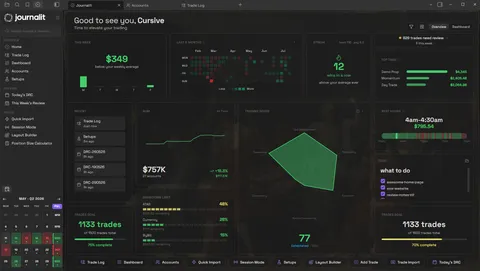
Journalit Home View brings reviews, goals, account metrics, and performance context into one journal.
Edgewonk pricing in 2026
Edgewonk currently presents one full-access paid plan. Its live pricing offer is promotional, so this comparison records the exact term shown rather than converting it into a misleading annual price.
- Edgewonk starting price
- $197 / 16 months (limited-time offer; VAT may apply)
- Edgewonk free tier
- No ongoing free plan listed
- Journalit starting price
- Free
- Journalit free tier
- Unlimited trades, accounts, analytics, templates, and reviews
Bottom line: Journalit gives you the core journal without a subscription and keeps the files in your own Obsidian vault. Edgewonk may justify its paid plan if its Tiltmeter and mental-statistics presentation, extensive import support, and browser-based workflow are central to how you review trades.
Quick verdict
- Free-plan focus
- Journalit if you want the core journal without starting on a paid plan.
- Psychology-analysis focus
- Journalit for Session Mode, custom review fields, mistake tracking, missed trades, recurring reviews, and mental ratings; Edgewonk if you specifically prefer its Tiltmeter and mental-statistics presentation.
- Offline ownership focus
- Journalit if you want to keep your journal on your own device instead of inside a hosted black box, with screenshots and recurring reviews.
Checked 12 Aug 2026 · View pricing source
Is Edgewonk worth it?
Edgewonk and Journalit overlap on journalling and analysis, but the strongest reasons to choose each product are different.
Edgewonk is worth it if...
You specifically prefer its Tiltmeter, mental-performance statistics, report cards, and large published list of platform importers.
Journalit is worth it if...
You want Session Mode, custom review fields, mistake tracking, missed trades, recurring reviews, and mental ratings alongside an offline Obsidian journal stored as files you control.
Edgewonk is a worse fit if...
You do not want journal access tied to a web subscription, or you need a complete portable archive of notes and screenshots rather than a partial data export.
Why traders look for an Edgewonk alternative
The main differences are subscription access, offline use, where the journal files live, and how much content can be carried into another tool.
Want an ongoing free tier
Journalit gives you unlimited trades, unlimited accounts, analytics, templates, and reviews on the free tier.
Want a complete local record
Journalit stores trade notes, screenshots, templates, and reviews in your vault instead of separating portable trade data from subscription-only journal content.
Want offline access
Journalit works through local Obsidian files. Edgewonk's official help says its browser-based product requires an internet connection.
Journalit vs Edgewonk feature table
| Feature | Journalit | Edgewonk |
|---|---|---|
| Journal storage | Markdown files in your own Obsidian vault | Online browser-based account |
| Psychology workflow | Session Mode, custom review fields, mistake tracking, missed trades, recurring reviews, and mental ratings | Tiltmeter, mental statistics, mistake tracking, missed trades, and report cards |
| Offline use | Yes | No; an active internet connection is required |
| Free tier scope | Unlimited trades and accounts on the free tier | No ongoing free plan listed |
| Data export | Journal content remains as readable files in your vault | Excel export covers some data points; official docs exclude screenshots and notes |
| Broker and platform imports | Pro: Trade Import for supported broker files and automatic Trade Sync for supported brokers | Extensive published importer list, including MT4 and MT5 auto-sync |
| Access across devices | Obsidian desktop and mobile; sync method remains your choice | Browser access on phones, tablets, and computers; no native app documented |
Pricing snapshot
Journalit
- Unlimited trades and accounts
- Analytics included
- Review workflows included
- Built-in templates included
- CSV import included
- Trade Sync for supported brokers
- Keeps unlimited trades and accounts
- Keeps the free plan features
Checked: 6 Feb 2026 · USD
Edgewonk
- One full-feature plan
- Unlimited trades, journals, accounts, and imports
- 14-day money-back guarantee advertised
- No ongoing free plan listed
Checked: 12 Aug 2026 · USD before VAT; limited-time offer as listed by Edgewonk
Pricing changes. Confirm on the vendor site before purchasing.
How to switch from Edgewonk to Journalit
Export what Edgewonk makes portable before ending access, then rebuild the journal around source files you can keep.
- 1
Export before cancelling
Use Edgewonk's Journal export to download the available Excel data while the account is active. Keep original broker exports as well when they contain a cleaner history. - 2
Preserve notes and screenshots
Edgewonk says its export does not include screenshots, notes, or every journal field. Save any excluded material you need before cancellation or trial expiry. - 3
Install Journalit in Obsidian
Create the vault-based journal first so imported records and reconstructed notes have a permanent destination. - 4
Import and verify a sample
Use a supported broker adapter or manual mapping for the Excel or broker export. Check symbols, timestamps, fees, P&L, and duplicate classifications before importing the full history.
Where Edgewonk may still be better
Tiltmeter and mental statistics
Broader published import list
Browser access everywhere
Edgewonk alternative FAQ
Try Journalit free
Install Journalit and get templates, reviews, and analytics immediately. Upgrade only if you want Trade Import and automatic trade sync.