TradeZella alternative with a genuine free journalling plan
Journalit is a free, lower-cost TradeZella alternative for traders who prioritise notes, screenshots, analytics, and recurring reviews. TradeZella offers more built-in AI, backtesting, replay, broker integrations, mentorship, and community tooling. This comparison explains the trade-off using pricing and product information checked in September 2026.
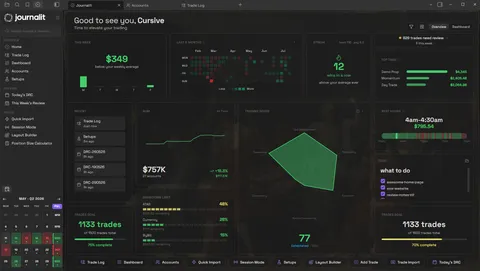
Journalit Home View brings reviews, goals, account metrics, and performance context into one journal.
TradeZella pricing in 2026
This is the answer most comparison shoppers actually want first: is TradeZella free, how much does it cost, and when is Journalit the better value?
- TradeZella starting price
- Essential $35/mo or $315/yr, Pro $59/mo or $531/yr, Ultra $99/mo or $891/yr
- TradeZella free tier
- No ongoing free plan. A trial or promotion is not a free tier.
- Journalit starting price
- Free
- Journalit free tier
- Unlimited trades, accounts, analytics, templates, and reviews
Bottom line: Journalit provides the core journalling experience free and charges for automation. TradeZella starts with a paid subscription, but includes a broader set of integrated tools such as AI analysis, backtesting, replay, broker connections, mentorship, and community features.
Quick verdict
- Price focus
- Journalit if you want to journal, analyse, and review trades without starting a paid subscription.
- Advanced tooling focus
- TradeZella if built-in AI, replay, backtesting, broad broker connections, and mentorship tools justify the subscription.
- Notes and control focus
- Journalit if you want Obsidian-based notes, screenshots, recurring reviews, and your journal kept on your own device.
Checked 2 Sep 2026 · View pricing source
Current TradeZella plan prices
| Plan | Monthly | Annual | Annual monthly equivalent |
|---|---|---|---|
| Essential | $35 | $315 | about $26.25 |
| Pro | $59 | $531 | about $44.25 |
| Ultra | $99 | $891 | about $74.25 |
Annual plans are billed annually, not monthly. TradeZella rounds the advertised equivalents to $26, $44, and $74 per month. Prices and plan details were checked 2 Sep 2026 against TradeZella’s official pricing help page and public pricing page, and its July 2026 pricing update.
Compare this with Journalit pricing or see exactly what is included in the free trading journal.
Is TradeZella worth it?
TradeZella can be worth paying for, but not for the same reasons that make Journalit attractive.
TradeZella is worth it if...
You will use Zella AI and agents, automated journalling, broad broker connections, replay, backtesting, Mentor Mode, Spaces, or Zella University.
Journalit is worth it if...
You want the core journal free, a lower-priced automation upgrade, flexible Obsidian notes, recurring reviews, and your journal kept on your device.
Journalit is a worse fit if...
You need built-in replay, backtesting, an AI trading assistant, mentor collaboration, community spaces, or TradeZella’s wider integration catalogue.
Why traders choose Journalit instead
The practical differences are price, where the journal is kept, how much flexibility you want in your notes, and whether you need TradeZella’s broader toolset.
Need a usable ongoing free plan
Journalit gives you unlimited trades and accounts, notes, screenshots, analytics, templates, and recurring reviews without a subscription.
Want Obsidian flexibility
Journalit combines trade records with flexible written notes, screenshots, linked context, and review templates inside Obsidian.
Want to keep your data on your own device
Journalit keeps the journal files you work with on your device. TradeZella is a hosted service accessed through your account.
Journalit vs TradeZella feature table
| Feature | Journalit | TradeZella |
|---|---|---|
| Data ownership | You own all of your journal data on your device | Hosted cloud account |
| Notes and journalling | Flexible Obsidian notes, screenshots, linked context, custom fields, and recurring review templates | Trade and day notes, Notebook folders and templates, attachments, speech-to-text, and AI-assisted note creation and search |
| Analytics and reports | Dashboards, filters, and analytics included on the free plan | 300+ published reports plus weekly and monthly AI review reports |
| Free tier scope | Ongoing free plan with unlimited trades and accounts, notes, screenshots, analytics, and reviews | No ongoing free plan; Essential starts at $35 per month or $315 per year |
| Reviews and accountability | Daily, weekly, monthly, quarterly, and yearly reviews included | Strategies, rules, Progress Tracker, AI review reports, Session Review agent, and Mentor Mode |
| Imports and broker automation | Manual entry is free. Pro adds supported broker imports plus MT4 and Tradovate sync | Auto-sync, file upload, and manual import, with 500+ brokers and platforms advertised |
| AI assistant and agents | No comparable built-in trading assistant | Zella AI on all plans; AI agents and higher credit limits on Pro and Ultra |
| Replay and backtesting | No built-in replay or backtesting | Trade Replay, manual backtesting, and plan-dependent automated backtesting |
| Education and community | No comparable integrated education suite | Zella University, Spaces, leaderboards, review requests, and Mentor Mode |
Pricing snapshot
Journalit
- Unlimited trades and accounts
- Analytics included
- Review workflows included
- Built-in templates included
- CSV import included
- MT4 and Tradovate sync included
- Keeps unlimited trades and accounts
- Keeps the free plan features
Checked: 6 Feb 2026 · USD
TradeZella
- 1 active account and 10 strategies
- 500 Zella AI credits per month
- Manual backtesting included
- Up to 50 active accounts
- 1,500 Zella AI credits and AI agents
- 10 automated backtests per month and unlimited replay
- Unlimited active accounts
- 3,000 Zella AI credits per month
- 100 automated backtests per month
Checked: 2 Sep 2026 · USD (as listed by TradeZella)
Pricing changes. Confirm on the vendor site before purchasing.
How to switch from TradeZella to Journalit
The migration is mostly about getting a reliable history export and then deciding whether you want ongoing automation afterwards.
- 1
Export trade history
Export your history from the original broker or platform so you have the cleanest available source file. - 2
Install Journalit in Obsidian
Set up the journal first so imported trades land inside the structure you will actually keep using. - 3
Import the history and spot-check results
Validate symbols, timestamps, and fees on a small sample before trusting the entire migration. - 4
Decide whether ongoing automation matters
If manual upkeep becomes annoying, add trade import or MetaTrader 4 sync later rather than complicating the initial move.
Where TradeZella may still be better
Trade replay
AI, integrations, and collaboration
TradeZella alternative FAQ
Try Journalit free
Install Journalit for free to journal unlimited trades and accounts with notes, screenshots, analytics, templates, and reviews. Upgrade only when you want supported broker imports or automatic sync.