TraderSync alternative for traders who want actual ownership and lower cost
If TraderSync feels too expensive or too hosted, Journalit is the stronger alternative. You get a real free tier, keep your journal on your own device, and get a workflow built around screenshots, notes, and recurring reviews instead of only web dashboards.
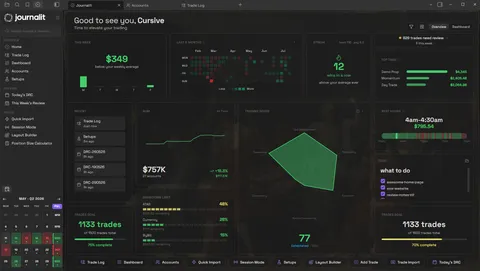
Journalit Home View brings reviews, goals, account metrics, and performance context into one journal.
Journalit or TraderSync: the quick answer
The better choice depends on whether you value a hosted replay product or a lower-cost journal that stays on your own device.
Choose Journalit for ownership and notes
Choose TraderSync for built-in replay
Switch with a trade-history export
TraderSync pricing in 2026
Many traders searching for a TraderSync alternative are really asking whether the pricing is justified for their workflow.
- TraderSync starting price
- $29.95/mo monthly or $269.52/yr yearly
- TraderSync free tier
- No equivalent ongoing free tier listed
- Journalit starting price
- Free
- Journalit free tier
- Unlimited trades, accounts, analytics, templates, and reviews
Bottom line: Journalit is the better value if you want a lower-cost, private, notes-first trading journal that you can keep on your own device. TraderSync makes more sense when you specifically want a hosted web dashboard and are comfortable paying SaaS pricing for it.
Quick verdict
- Price focus
- Journalit if you want the core journal without starting on a paid plan.
- Replay or simulation focus
- TraderSync if that hosted workflow matters more than ownership.
- Ownership and notes focus
- Journalit if you want to keep your journal on your own device instead of inside a hosted black box, with screenshots and recurring reviews.
Checked 14 Sep 2026 · View pricing source
Is TraderSync worth it?
TraderSync can be worth paying for, but only if its hosted strengths match what you actually care about.
TraderSync is worth it if...
You want replay, simulation, and a dedicated hosted dashboard, and you do not mind paying more for that fuller SaaS workflow.
Journalit is worth it if...
You want something leaner, cheaper, and better suited to screenshots, written notes, and recurring trade review.
TraderSync is a worse fit if...
You want a journalling flow with fewer clicks, less software overhead, and more room for reviewing trades after the fact.
Why traders look for a cheaper alternative to TraderSync
The common reasons are price, too much click-heavy software overhead, and wanting more room for notes and review context instead of only a SaaS dashboard.
Want a cheaper long-term setup
Journalit gives you the core journal on the free plan. Pro is for Trade Import plus Trade Sync for supported brokers.
Want something leaner
Journalit is better if you want fewer clicks, less software overhead, and a journalling flow that stays focused on the important parts.
Want to keep your data on your own device
Journalit keeps your journal on your own device. If you stop using the plugin later, your journal still remains readable.
Journalit vs TraderSync feature table
| Feature | Journalit | TraderSync |
|---|---|---|
| Data ownership | You own all of your journal data on your device | Hosted cloud account |
| Offline use | Yes, because your journal stays on your own device | Mostly no, because the workflow is web-first |
| Built-in templates | Trade notes plus daily, weekly, monthly, quarterly, and yearly reviews | Depends on plan and workflow style |
| Analytics and dashboards | Included free | Tiered |
| Free tier scope | Unlimited trades and accounts on the free tier | No equivalent free tier listed |
| Automated imports | Pro: Trade Import plus Trade Sync for supported brokers | Yes, varies by broker and plan |
| Trade replay | No | Yes, with replay and simulation tools |
| Mobile experience | Obsidian mobile supported, desktop still recommended | Dedicated mobile experience |
Pricing snapshot
Journalit
- Unlimited trades and accounts
- Analytics included
- Review workflows included
- Built-in templates included
- CSV import included
- Trade Sync for supported brokers
- Keeps unlimited trades and accounts
- Keeps the free plan features
Checked: 6 Feb 2026 · USD
TraderSync
- Monthly billing listed
- Annual billing listed
- Monthly billing listed
- Annual billing listed
- Monthly billing listed
- Annual billing listed
Checked: 14 Sep 2026 · USD (as listed by TraderSync)
Pricing changes. Confirm on the vendor site before purchasing.
How to switch from TraderSync to Journalit
The migration path is usually simpler than traders expect because Journalit only needs valid history and a journal structure to store it in.
- 1
Export your history to CSV
Pull the trade history either from TraderSync or directly from your broker, depending on which source has the clearest fills, timestamps, fees, and realised P&L. - 2
Install Journalit in Obsidian
Set up the journal first so the imported data has a stable destination. - 3
Import the history and verify a sample week
Use a supported broker adapter when one exists. Otherwise map the CSV columns manually, then spot-check symbols, timestamps, fees, P&L, and duplicate classifications before trusting the full migration. - 4
Layer in automation only if needed
Trade Import may be enough. If you also want an ongoing broker connection, enable a supported Trade Sync provider later.
Where TraderSync may still be better
Replay and simulation
Mobile-first SaaS experience
TraderSync alternative FAQ
Ready to try Journalit?
Install free and start journalling in Obsidian. Upgrade to Pro for Trade Import plus Trade Sync for supported brokers.